Free · Beta 0.10.1 · Browser, Windows and Linux · macOS pending

Design, fly and verify your rocket in one workstation.

Astraea takes a high-power rocket from parametric airframe to six-degree-of-freedom flight simulation, Monte Carlo landing dispersion and real flight-log comparison, with one engine that gives the same answers in your browser and on your desktop.

No account. Nothing to install to try it. Apache-2.0 licensed.

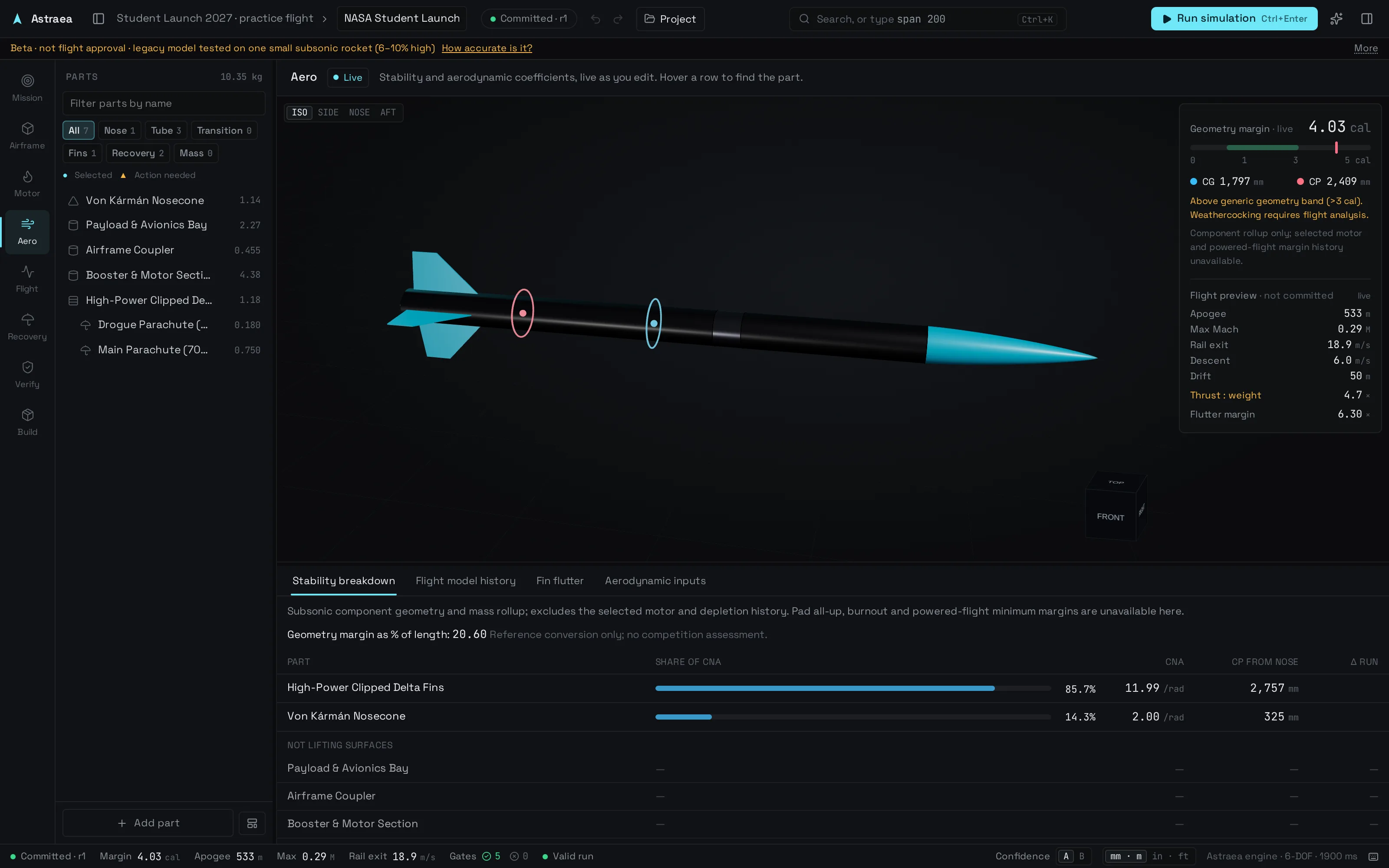
The Astraea workstation: a 3D high-power rocket with live center of gravity and center of pressure markers, static margin, and a live flight preview showing apogee, Mach, rail exit speed, descent rate and drift.

One pipeline

Every stage of a launch, connected.

Change a fin and the stability, the flight, the landing and the checks all follow. No exporting between five tools.

  1. 01MissionTarget altitude, launch site and conditions.
  2. 02AirframeParametric nose cones, tubes, transitions and fins with live CG and CP.
  3. 03MotorCertified curves, ThrustCurve.org search, a curve editor and propellant chemistry.
  4. 04AeroBarrowman stability, transonic drag and fin flutter.
  5. 05Flight6-DOF trajectory, events, and Monte Carlo dispersion.
  6. 06RecoveryDual deployment, bay packing and ejection-charge sizing.
  7. 07VerifyRequirement gates and evidence from real flight logs.
  8. 08BuildSTEP, STL, blueprints, and OpenRocket or RockSim files.

Live tuning

See the flight change while you design.

Static margin, CG and CP update on every edit. A moment after you stop, the engine flies the design again and shows apogee, Mach, rail exit speed, descent rate and drift next to your last committed run, with thrust-to-weight and fin flutter margin alongside.

  • Previews land moments after you stop editing
  • Warnings use the same gates as a full run
  • Previews are labeled as previews, never as results
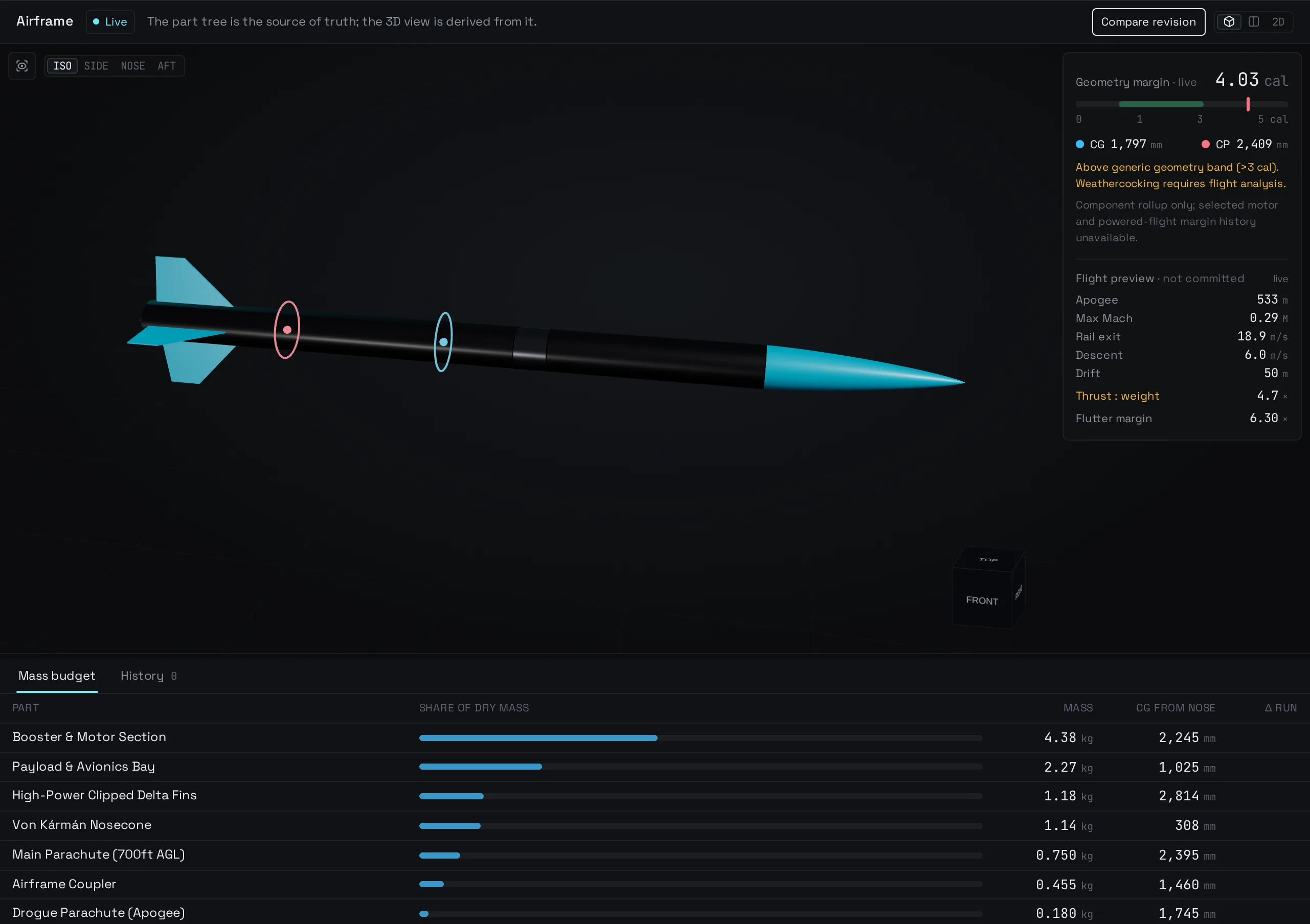
Airframe stage with the 3D rocket, live stability, mass budget and a live flight preview.

Flight dynamics

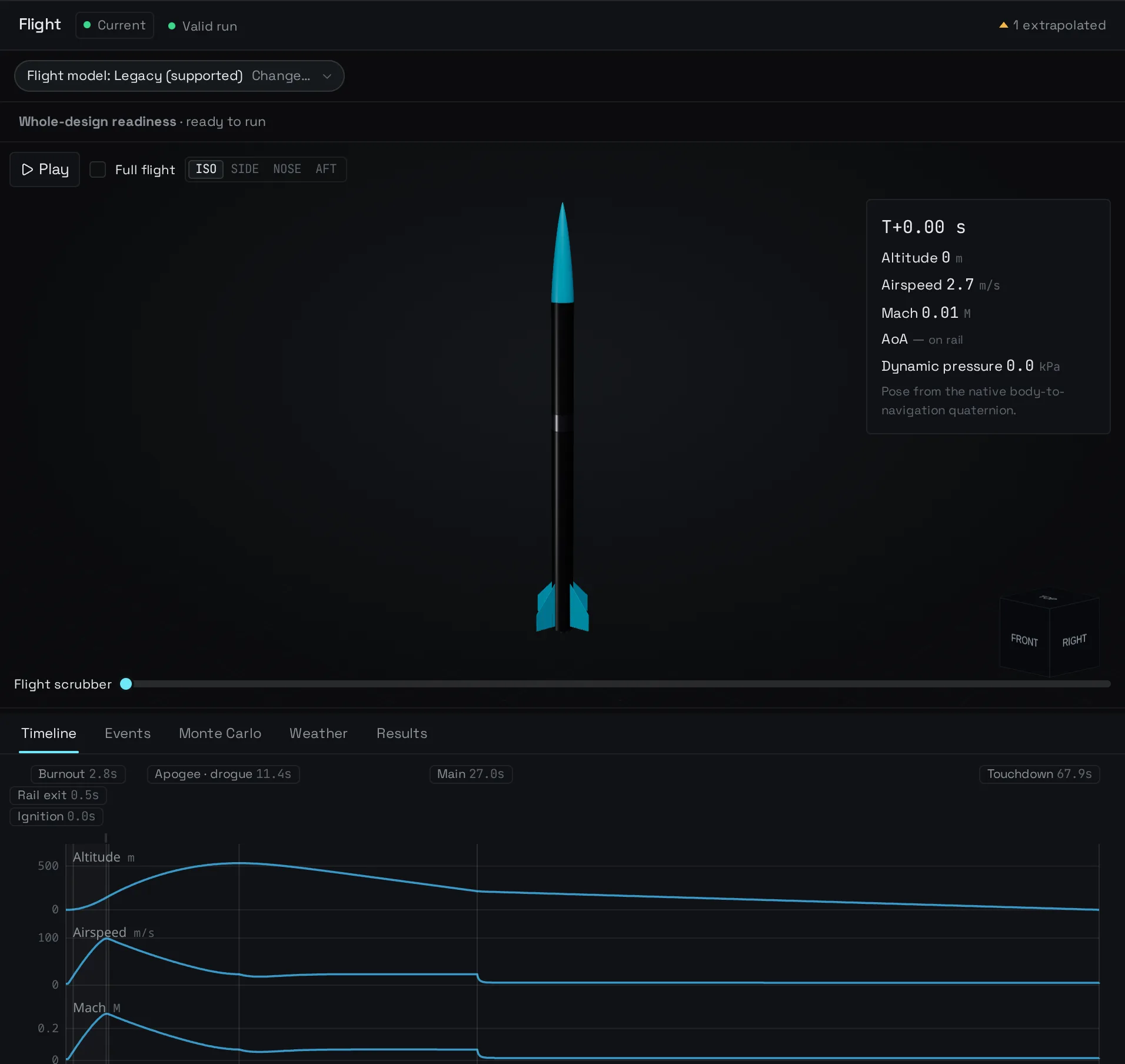
Six degrees of freedom, not a point mass.

A quaternion rigid-body model integrated with an adaptive Dormand–Prince solver, with root-found events for rail exit, burnout, apogee, deployment and touchdown. Scrub the flight in 3D and read altitude, airspeed, Mach, angle of attack and dynamic pressure at any instant.

  • Transonic and supersonic drag build-up
  • Wind, rail angle and launch-site altitude
  • Every result states whether it stayed inside the model's envelope
Flight stage: the rocket on the rail with a flight scrubber, event markers and altitude, airspeed, Mach, angle of attack and dynamic pressure charts.

Dispersion

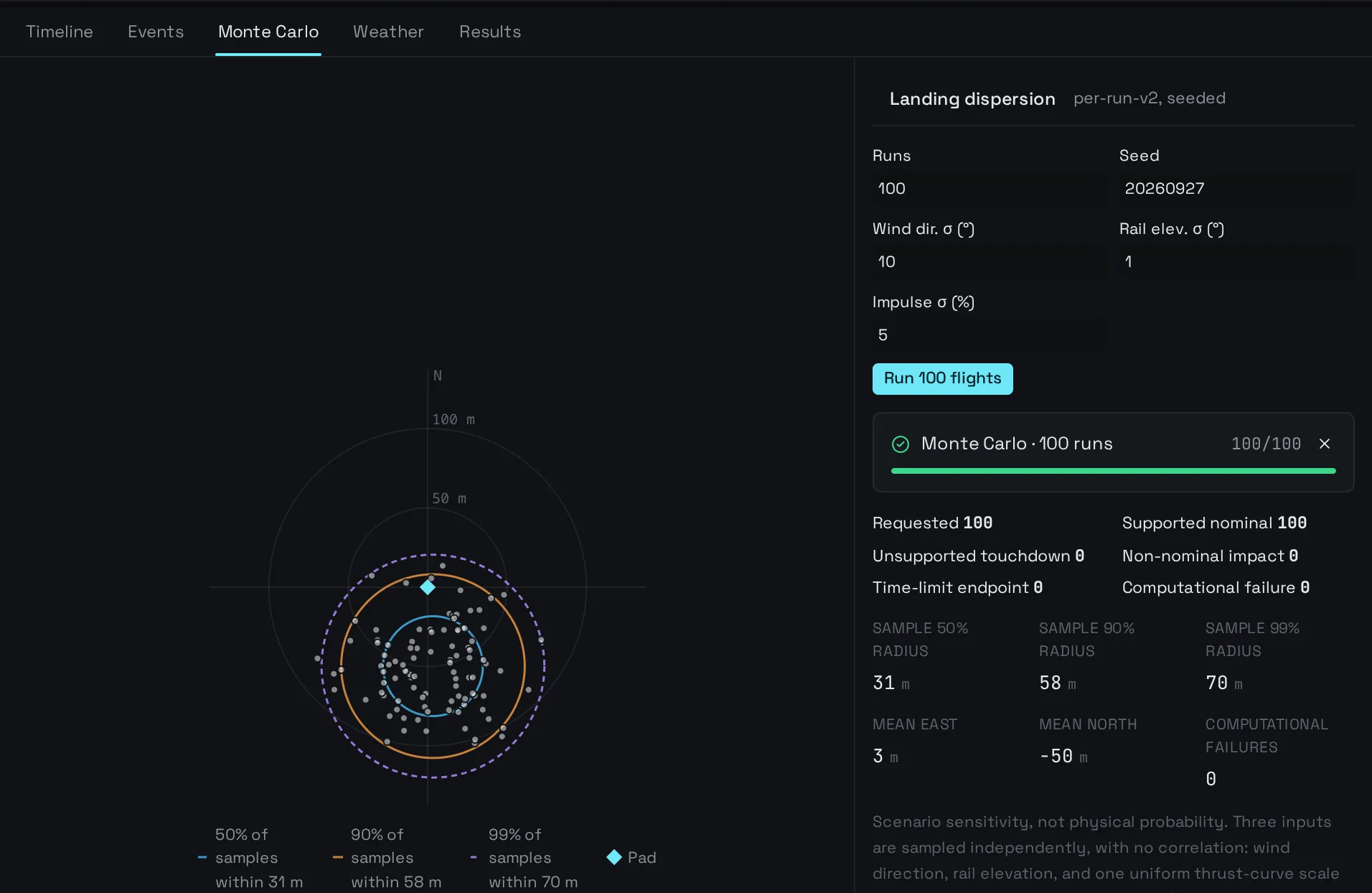
Explore the modeled landing spread.

Monte Carlo re-flies the design up to 1,000 times with varied wind direction, rail angle and motor impulse, spread across your CPU cores. Landing points, 50/90/99% containment rings and mean drift build up live, and a cancel never leaves a partial answer behind.

  • Seeded and reproducible run for run
  • Waiver-cylinder checks and KML export for Google Earth
Monte Carlo landing dispersion: scattered landing points with 50, 90 and 99 percent containment rings and summary statistics.

Propulsion

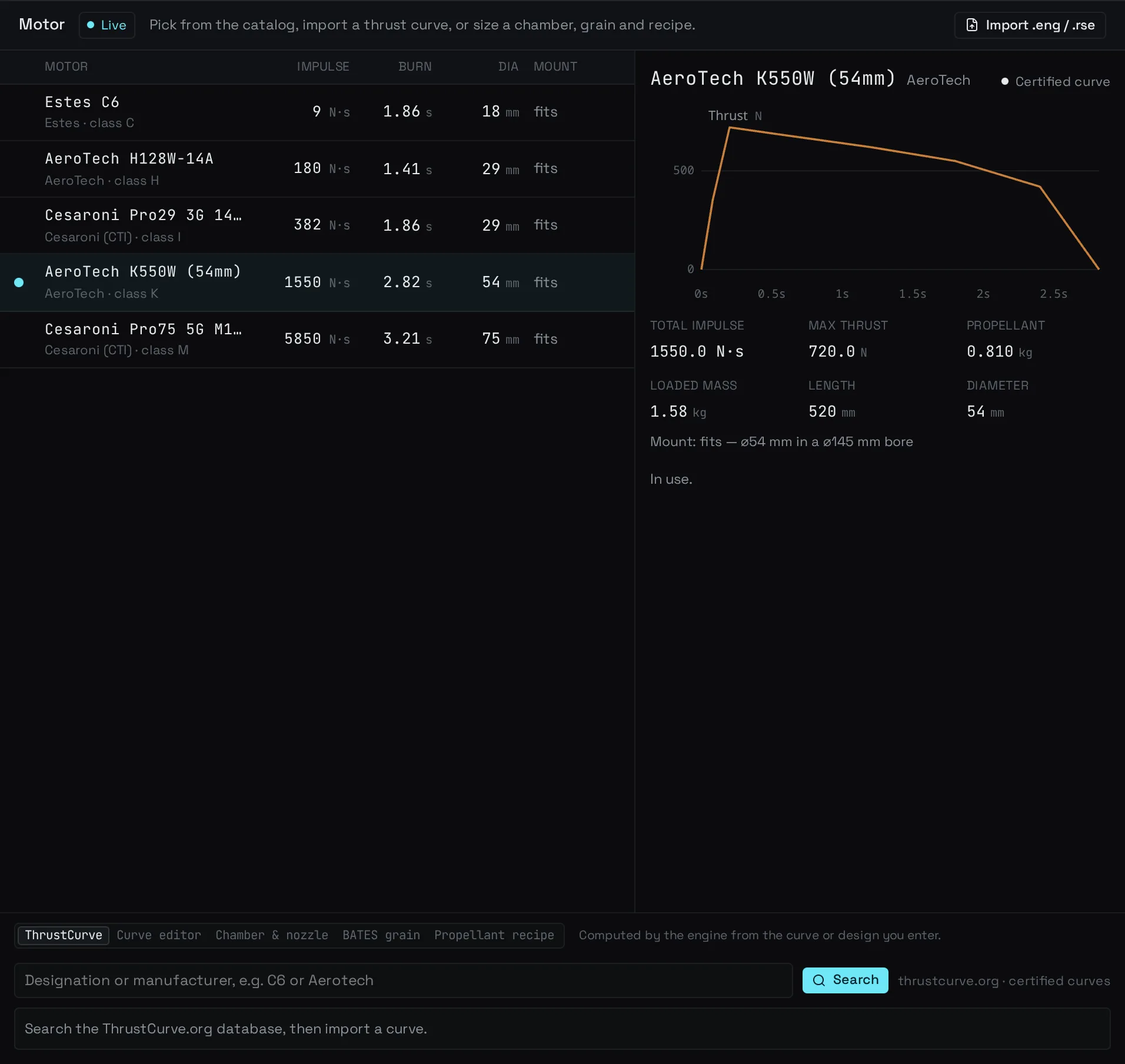
Real motors, or your own.

Start from certified Estes, AeroTech and Cesaroni curves, search ThrustCurve.org, or import RASP .eng and RockSim .rse files. Edit a copy of any curve and Astraea recomputes impulse, class, burn time and peak thrust. Size chambers and nozzles with a chemical-equilibrium solver.

  • Mount fit checked against your motor tube
  • Edited motors never overwrite the original
Motor stage: a catalog of certified motors and the thrust curve of the AeroTech K550W.

Verification

Checked against requirements, then against reality.

Every run is graded against clear gates: rail exit speed, fin flutter margin, landing speed and energy, and the model's own envelope, each with where to change the design. Then load an altimeter or GPS log, overlay it on the simulation and fit an effective drag coefficient from the coast phase.

  • Imported logs keep their original bytes and a SHA-256
  • Fitted drag is a reviewed candidate, never applied silently
Verify stage: pass and fail gates for fin flutter, rail exit speed, engine envelope, landing speed and landing energy.

One engine

The same Rust engine, compiled to WebAssembly, runs in the browser and the desktop app. Same inputs, same numbers, on every system.

Your files stay yours

Projects live on your device and in plain .astraea.json files. No account, no upload, no lock-in.

Works with your tools

.ork.rkt.eng.rse.step.stl.kml.svg.png

Built honestly

A design tool, not a flight certificate.

Beta. Legacy model only. Apogee tested blind on one small subsonic rocket: predictions ran 6–10% high. That evidence does not cover the experimental candidate model. Other vehicles and supersonic flight are untested. Not flight approval. How accurate is it?

Astraea is an engineering tool for student teams, labs and high-power rocketry flyers. It is not certified flight-readiness software. Software consistency checks and comparisons with NASA ARCAS data do not establish accuracy across rockets, and passing them is not flight approval; follow your club's and launch's safety rules. 1.0 ships once a set accuracy target is met on independent flights, and beta users can help by sharing a flight from the Verify stage.

Read the validation record

NASA ARCAS wind-tunnel and flight material supports checks at specific geometries and conditions, not blanket validation of apogee, trajectory, recovery or landing dispersion.

The Estes Cosmic Cargo comparison uses estimated fin geometry, conflicting public mass and length records, and unrecorded launch weather. Its documented baseline over-predicts the flight. Adjusting payload or drag against that same flight is fitting, not an independent validation result.

Next gate: reproduce evidence with the current production engine, obtain measured flight inputs and raw logs, freeze predictions before comparison, and publish errors and uncertainty on separate validation cases. Passing regression tests alone does not close this gate.

Get Astraea

Use it in your browser, or download the desktop beta.

Beta 0.10.1 installers for Windows, macOS and Linux are on GitHub. This is a beta, not flight approval: independent flight validation is still open, and the macOS build has not finished acceptance testing.

The desktop app works offline and saves real files. Installers are not code-signed yet: on Windows choose More info → Run anyway; on macOS right-click the app and choose Open the first time.